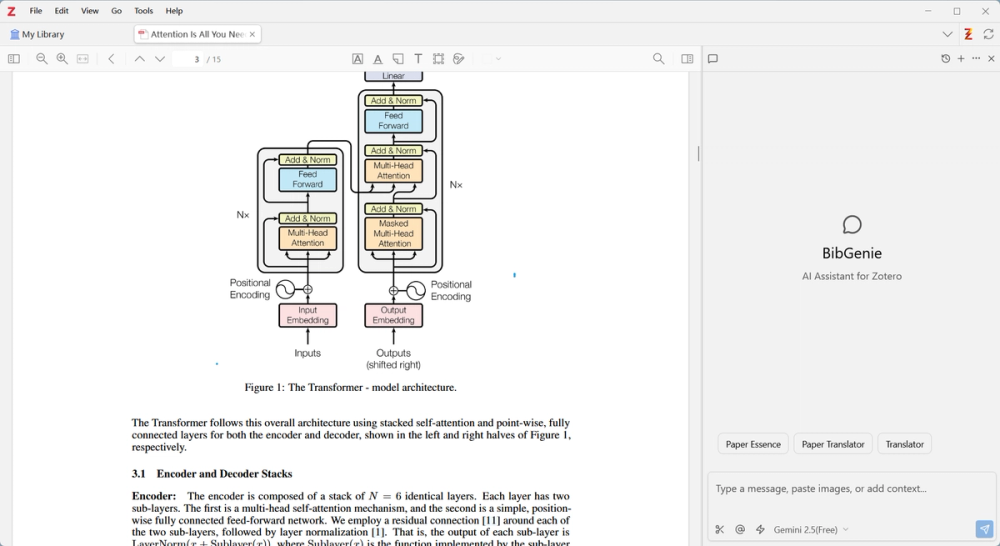
Bibgenie: Your native AI research agent for Zotero. It reasons across your library and reading context to deliver intelligent synthesis and retrieval, empowering you to uncover deeper insights from your research, faster.
Key Features
Chat with Your Library
Ask questions about your research and receive answers drawn from your Zotero library. BibGenie searches across metadata, full-text content of PDFs, notes, and annotations to provide grounded responses.
Add Everything to Chat
Easily bring any Zotero resource into your conversation:
- PDFs — Add entire PDF attachments for analysis
- Notes — Include Zotero notes and annotations
- Collections — Add all items from a collection with one click
- Tags — Pull in all papers tagged with a specific label
- Text Selections — Select text in the PDF reader and add it directly to chat
- PDF Pages — Reference specific pages while reading
- Snapshots — Add snapshots of web pages to chat
- Drag & Drop Screenshots — Drag to select any area on your screen and add it directly to chat for AI analysis
Seamless Zotero Integration
BibGenie lives directly in Zotero as a side panel. No external apps, no switching contexts. When you're reading a PDF in Zotero's built-in reader, BibGenie knows exactly which page you're on and can reference it in conversations. Context-aware menus let you add collections, tags, and items to chat without interrupting your reading flow.
Privacy-First Design
Your data stays yours. BibGenie offers:
- Local-first architecture — Process PDFs locally without uploading to external servers
- Direct provider connection — When using cloud LLMs, your data is sent directly from your computer to the model provider. If you use local LLMs like Ollama or LM Studio, your data never leaves your computer at all.
Choose Your Model
Pick from a curated selection of leading models, or bring your own:
- Kimi
- DeepSeek
- XAI
- OpenRouter
- Gemini
- Ollama
- LM Studio
- ...
- Bring Your Own Key
Built-in Research Prompts
Start with powerful pre-configured prompts:
- Paper Essence — Extract the fundamental problem, entry perspective, key method, and core finding from any paper
- Summarize Literature — Quickly summarize core viewpoints, methods, and conclusions
- Paper Translator — Precision academic translation with terminology glossaries
- Explain Concept — Transform complex concepts into simple explanations
MCP Server Support
BibGenie includes a Model Context Protocol (MCP) server, enabling external AI tools (like Claude Code, Cursor, Copilot, OpenClaw, etc.) to access your Zotero library programmatically. Connect BibGenie with other AI applications to extend its capabilities.
Save Back to Zotero
AI-generated content can be saved directly back to your library:
- Save chat messages as Zotero notes
- Export AI responses as formatted notes attached to items
- Compatible with Better Notes plugin for enhanced note formatting